
Add Nelo promotional messaging to your site
Add Nelo promotional messaging to your site to display financing options on product, cart, and checkout pages.
Use Nelo promotional messages to show financing information on your product, cart, and checkout pages.
This guide is for merchants integrating directly with Nelo's API. If your store uses an ecommerce platform supported by Nelo, follow the integration guide for that platform instead.
Nelo promotional messaging requires no package installation or build step. You add the Nelo script once, then place an HTML element wherever you want a message to appear. Nelo provides the message copy, styling, logo, and current campaign automatically.
Quick start
You need the publishable key Nelo provides during onboarding.
Your publishable key is safe to include in your page source. It only authorizes requests for promotional content. It cannot move money, create orders, or access customer data.
Do not use your secret API key in the browser.
1. Load nelo.js
nelo.jsAdd the following configuration and script to the <head> of every page where you want to display a Nelo message:
<script>
  window._neloConfig = {
    publishableKey: 'YOUR_PUBLISHABLE_KEY'
  };
</script>

<script src="https://js.nelo.co/v1/nelo.js" defer></script>
The configuration must be defined before nelo.js runs.
Keep the script URL as shown above. Do not self-host or pin a copy of the library, because improvements and campaign updates are delivered through this URL.
2. Add a promotional message
Place a nelo-as-low-as element near the product price, cart total, or add-to-cart button:
<div
  class="nelo-as-low-as"
  data-amount="319120"
  data-currency-code="MXN"
  data-page-type="product">
</div>
data-amount is the price in cents, expressed as an integer.
For example: 319120 = $3,191.20 MXN. 5000 = $50.00 MXN.
Use the price the shopper would actually pay for the current selection, including any applicable discounts.
Once the script loads, Nelo automatically fetches and renders the appropriate promotional message inside the element.
Choose a message type
Nelo provides two promotional message components.
| Class | What it displays | Recommended placement |
|---|---|---|
nelo-as-low-as | A compact financing message with the Nelo logo, such as a pay-in-installments message. | Product or cart pages, close to the price or add-to-cart button. |
nelo-education-card | An explainer showing how installments and repayment work, including SPEI transfer or OXXO. | Checkout, next to the Nelo payment option. |
Financing message
Use nelo-as-low-as when you want to show the shopper an available financing message based on the current amount:
<div
  class="nelo-as-low-as"
  data-amount="319120"
  data-currency-code="MXN"
  data-page-type="product">
</div>
The container inherits your page's font and text color. Set the width you want it to occupy, and the message will wrap as needed.

Example of promotional message
Education card
Use nelo-education-card near the Nelo payment option during checkout:
<div
  class="nelo-education-card"
  data-amount="319120"
  data-currency-code="MXN"
  data-page-type="checkout">
</div>
Attribute reference
| Attribute | nelo-as-low-as | nelo-education-card | Value |
|---|---|---|---|
data-amount | Required | Optional | Integer amount in cents. For example, 319120 represents $3,191.20 MXN. |
data-currency-code | Required | Optional | MXN |
data-page-type | Optional | Optional | product, cart, or checkout |
If nelo-as-low-as is missing data-amount or data-currency-code, the message will not render and Nelo will log a warning in the browser console.
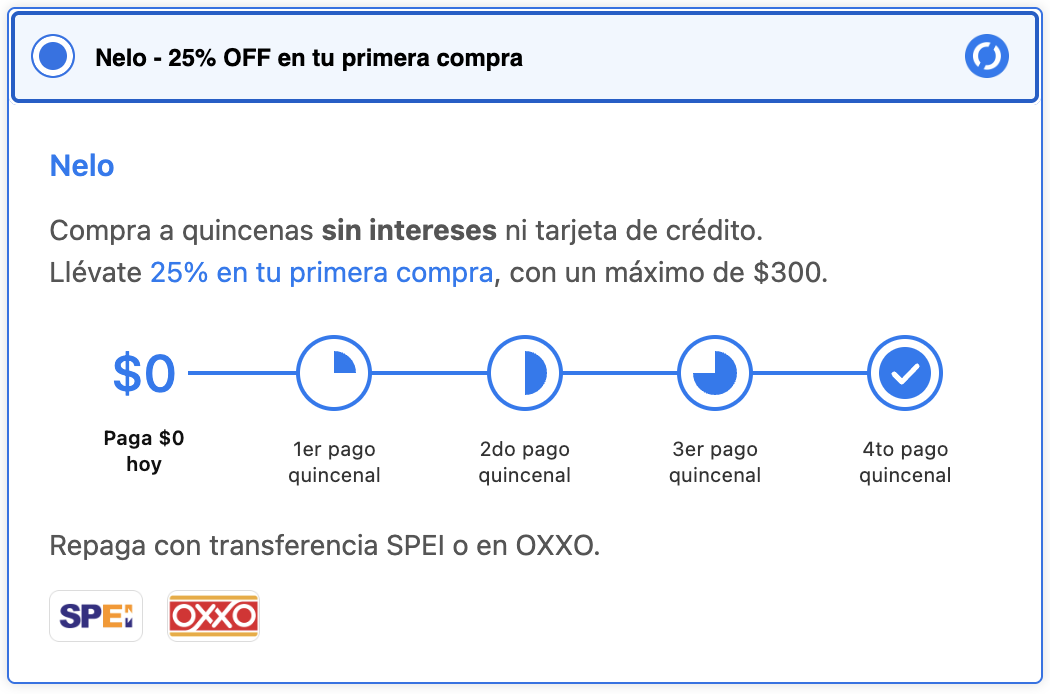
Example of educational card
Update the message when the price changes
If the displayed price changes, update data-amount.
This commonly happens when a shopper:
- selects a different SKU or product variant;
- changes the quantity;
- applies a discount; or
- updates the cart.
For example:
document.querySelector('.nelo-as-low-as').dataset.amount =
  String(newTotalInCents);
Nelo watches the attribute and automatically re-renders the message using the new amount.
Dynamically inserted elements
Elements added after the initial page load are detected automatically, so client-rendered pages normally require no additional setup.
If your application replaces a large section of the DOM and a Nelo message does not appear, ask the library to scan the page again:
window.nelo.refresh();Language
Promotional messages are served in Spanish by default.
If the shopper's browser language is set to English, Nelo can serve the English version automatically.
To explicitly choose a language, set acceptLanguage in the configuration:
<script>
  window._neloConfig = {
    publishableKey: 'YOUR_PUBLISHABLE_KEY',
    acceptLanguage: 'es-MX'
  };
</script>
Browser auto-translation can modify the message after Nelo renders it. If the wording looks incorrect or inconsistent, disable browser auto-translate or explicitly set acceptLanguage.
Validate your integration
After installing the message, verify the following:
-
Open a product page.
Confirm that the Nelo message appears and that it corresponds to the price shown to the shopper. -
Change the amount.
Select another SKU or variant, change the quantity, or update the cart. Confirm that the Nelo message updates to reflect the new price. -
Check the network request.
Open your browser's developer tools and go to Network. Filter fornelo.You should see a
promotional-messagesrequest for each amount, returning HTTP200.
Troubleshooting
| Symptom | Likely cause and solution |
|---|---|
| Nothing renders and there are no Nelo requests in the Network panel. | nelo.js may not have loaded, or window._neloConfig may have been defined after the library ran. Check the script order and confirm that your publishable key is set. |
The console shows a warning about data-amount or data-currency-code. | A required attribute is missing or invalid. data-amount must be an integer in cents with no currency symbol, separators, or decimal point. |
Requests return HTTP 401. | The key is incorrect, or a secret API key was used instead of the publishable key. |
| The amount in the Nelo message does not match the amount on the page. | Confirm that data-amount is in cents. Sending pesos instead of cents results in an amount that is 100× too small. |
| The message renders correctly at first, but the wording later looks incorrect. | Browser auto-translate may be changing the rendered message. Disable it or set acceptLanguage explicitly. |
| The message disappears after client-side navigation. | Your framework may have replaced the message container. Render the element again with the correct class and attributes, then call window.nelo.refresh() if necessary. |
Good to know
- The publishable key is safe in page source. It only authorizes promotional content requests.
- Nothing blocks your checkout. These elements are presentational: if Nelo is unreachable, they stay empty and your page behaves exactly as before.
- Campaigns update themselves. The message text, highlight and logo come from Nelo, so a new campaign reaches your store without a deploy on your side.
Complete example
The following example includes the configuration, Nelo script, and a product-page promotional message:
<!doctype html>
<html lang="es">
<head>
  <meta charset="utf-8">
  <title>Product</title>

  <script>
    window._neloConfig = {
      publishableKey: 'YOUR_PUBLISHABLE_KEY'
    };
  </script>

  <script src="https://js.nelo.co/v1/nelo.js" defer></script>
</head>

<body>
  <main>
    <div
      class="nelo-as-low-as"
      data-amount="319120"
      data-currency-code="MXN"
      data-page-type="product">
    </div>
  </main>
</body>
</html>
If the product price changes dynamically, update the element's data-amount value with the new price in cents. Nelo will refresh the promotional message automatically.
Updated about 2 months ago